

Tools play a vital part in the SEO world. Having the right SEO toolset is like having hundreds of specialists at your disposal working for free (or for the cost of a monthly subscription).
However, with the growth in Cloud and software as a service applications, you can find a wide range of tools doing the same things with a range of costs.
Luckily. For you the reader, I have used quite a few tools over the 13 years of being involved in SEO and although I do love a new tool (a fact my accountant can attest to), I have some tested tools I constantly go back to.
Below I have outlined a few of my favourites according to the different parts of a successful SEO strategy.
Keyword Research Tool
Although stuffing keywords into content is a bit old hat, you still need to be able to rank for related search phrases. Finding phrases that bring in traffic and that you have a realistic chance of 1) ranking for or 2) converting or 3) catching people at the various parts of the buying or user journey is key.
Below I list some of the main tools, I have either used in the past or continue to use as part of this foundation part of SEO.
Google AdWords Tool – Before the introduction of tools and Google taking away parts of SEO research, Google’s AdWords Tool was a key part of getting monthly search volumes for keywords. However, in terms of SEO unless you have a paid AdWords account with a monthly budget of $250 or more, the data is now useless. Instead of getting exact monthly search volume you can get vague figures such as 1-1000 or 1001 – 10,000.
Google Search Results – One great way to get ideas for keywords is by typing them into Google itself. You can then clearly see what types of results come up and try even find different combinations you might not have thought about.
For Instance, typing “vehicle security systems” I can see:

The type of research that comes up – are these blog articles, products, service pages?
Local indicators – Even though I typed in “vehicle security systems”, without putting Sheffield (where I am based) it still brought up local results and a map listing for Google My Business results.
Other related words – “car alarms”, “security systems for cars”, etc. Obviously, I am limited in terms of knowledge if these words are searched but it gives me a start for further research.
SEMrush – SEMrush was not one of my favourite tools until a couple of years ago, mainly because I could not warrant the $99 per month expense. However out of all the tools I use, I would say it is one of the best in terms of keyword research. Not only can you spy on competitors, get monthly search volumes, come up with a wide range of different types of keywords, but you also get to know other ways you could be found. Whether that’s videos that show for a word, a local intent or even a featured snippet.
Ubersuggest – Neil Patel’s tool. This is a bit like an all-in-one SEO tool. It used to be free, not sure if it still is, but It is a great way to figure out SEO information about your site, including keyword ideas and keywords you are currently ranking for.
Moz – The grandparent of SEO software. Moz has been around for ages and is part of a suite of SEO tools I call all-in-one SEO software. I do not really use it as much as I used to as I find other tools seem to do everything better. I might try it again one day. If you are looking to learn about SEO or start a career in SEO, it is a great place to improve your knowledge, and find out about all the aspects of a successful strategy. Their keyword explorer tool allows you carry out comprehensive keyword research and you can get a free trial for a month (or it did the last time I used it).
Alsoasked.com – This is a bonus tool. It will give you extra ways to gain visibility you might not have even thought about. Have you done a Google Search and seen the box the appears that says “people also asked…” and then it gives you a list of popular questions with website links to answer them? Well, this tool brings back useful results according to the people also asked box.
In the example below I typed in the word SEO.
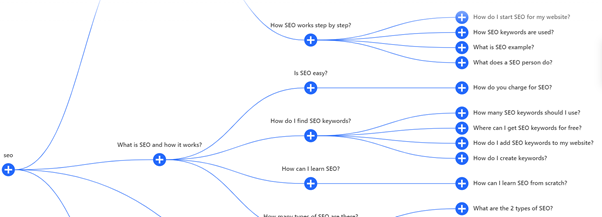
As you can see it has brought back a wide range of questions that the “people also asked” box shows. Not only is this great for SEO but also an amazing tool if you get stuck for content ideas.
Onpage Optimisation Tools
Onpage Optimisation is the part of SEO that helps Google figure out exactly what it is you are trying to rank for. Once you have your list of keywords you are going to want to optimise pages of your website according to key phrases.
Onpage optimisation has changed a lot over the last 5 years, and with every single keyword having its own ranking signals, it can be hard to figure out exactly how to optimise your content. With some keywords the old school mentioning 2% of the overall text can help you rank (keyword density), whilst for other keywords, mentioning your main keyword too many times and not mentioning other related topics, means you will see little ranking progress at all. You need a whole range of tools at your disposal and a decent copywriter. In fact, in my opinion the best experts now for ranking content are copywriters who can write in a natural way without worrying about SEO metrics.
However, if you do not have a copywriter at your disposal, or you want to make sure your content is optimised effectively, there are a few great tools I have used, I have outlined below.
Ryte.com – This was my go-to tool for a while before I decided I needed a tool I could use for many clients. This tool uses a keyword metric TF:IDF (term frequency–inverse document frequency). This Is more in line with how Google ranks keywords regarding natural language processing. Not only does it measure how many times a word is mentioned in a document, but it also compares this against a set of other documents. Ryte allows you to plot keywords you are trying to rank for with competitors and see what other related topics you should also be mentioning within the text. Ryte also has a useful text writer so you can get important information as you write content in terms of whether you are under or over-using words.
SEMRush.com – Again my go to tool. You can use either the project tracking tool for onpage optimisation research to compare your own content against competitors who are ranking for keywords, or you can use the stand-alone topic research tool. You can get some vital information like TF:IDF, related words, whether you mentioned a word too much, whether it appears in your headers or meta tags and whether you are using the right amount of content. You can also get ideas in terms of backlinks and whether there are other issues which may stop you ranking.
SEOQuake – An old school tool. This is not actually software, but it is FREE. It is a plugin that is added right into your website browser and is available on demand across any website. You can pull up information about word count and the number of times a word is mentioned. This tool is more about keyword density than any of the up-to-date ranking metrics though.
Moz – As above they also do an onpage optimisation test of your pages. I have not used this for a while, but still a good one to consider.
Inlinks – I did a brilliant review of this in a previous post, but I love it!!!! Not only is it great of creating internal links, in a way Google loves, but it also helps create schema markup (code that helps Google figure out what a page is about). It also has a section for optimising your pages according to key metrics related to Google’s Natural language processing (the part of the algorithm that closely matches the way Google rank’s keywords). It will let you know whether you are mentioning words enough, other related topics and even give you ideas about sections of content to write about to strengthen your message. You can even create a brief to send to your copywriter with key bits of important information.
Technical SEO
One of the most undervalued part of SEO is technical SEO. This Is the part that involves crawling your site like Google. For smaller sites such as 5 pages or less, it is easy to spot things that break such as broken links, but if you have 100 pages plus, it might not be feasible to click on every page, looking at page speed, broken links, page titles etc. This is where a technical crawler can help. They crawl every page of your site and report back on any issues that crop up and even recommend fixes. Depending upon your technical ability and budget, will influence the software you use.
Screaming Frog – Perhaps the best crawling tool in the SEO stratosphere is screaming frog. It is free for up to 500 URL’s and downloads to your desktop. The only downside it runs via your own laptop or computer, which means it can take up a lot of processing power and can freeze your computer on older laptops. It can also be quite daunting if you are not exactly sure what you are looking at. I love it because it is a one-off yearly fee, and the data you can export, is like having 100 SEO technicians at the touch of a button. It also allows to you add other programs such as analytics, search console or Google’s speed test API.
Deepcrawl – This was my go-to crawling tool, till I finally decided to add screaming frog to my arsenal. It is great if you have a general grasp of SEO but are looking for something a little bit more visual. It reports back on issues and what you need to do to fix them, Packages start from as little as $10 per month.
Ryte – Again probably one of the most underrated tools. This can also do daily crawls and report back on any crawling errors.
Offpage
Up until recently external link building was the most important SEO metric. Whilst you should still look to improve your authority score with quality links, finding and obtaining links gets harder and harder each year. There are a wide range of tools and wish I could use them all. I do not think there is one tool better than the others, but I do find Ahref’s to be leading the market in trustworthy metrics, followed closely by majestic.
Moz – This was the go-to authority score metric for years, until Google changed the way they valued links, and now gaming “domain authority” is how unscrupulous SEO’s sell link building packages. I do find that domain authority always seems to be artificially high compared to other metrics, however, it is still a good guide.
Ahrefs – My go to link building tool. Until recently I was using Majestic, but I just love Ahrefs. The data and research you can do is great for spying on competitors and monitoring your own backlink profile.
Majestic – As above another solid link building tool and the cheapest option out of the three. Breaks down links into categories.
Link prospector – Not many people report on this tool, but I love it. You can use it to find link building opportunities in bulk. You can put in keyword ideas, countries you are looking to get links from and then find strategies such as editorial links, directories, broken links, guest blog posts and a whole range of ideas. It will crawl the internet and find lots of opportunities saving you time. The only downside is the tool is not always 100% accurate and you will still have to manually check every link to make sure it is relevant.
Buzzstream – Once you have your opportunities you need to find a way to do outreach and contact the sites you are looking to obtain backlinks from, this is where I love BuzzStream. You can import a list of sites and it will crawl and get access to all the important information you need such as contact email address, link authority scores and you can even tag sites according to things such as tone of the content they write, any editorial guidelines or average content word length. You can then sync up your email address and create emails with mail merge allowing you to create semi-personalised emails in bulk. You can even automate follow-ups and it will run periodical checks for live links back to your site. If you want to use social media outreach, you can even plot communication via social media too.
Ranking Tools
Although keyword rankings are not as important KPi’s as conversion and traffic, without ranking keywords, you will not have any traffic to begin with. Plotting movements in ranking for keywords is vital to discovering why traffic may have increased or decreased. You could always do this manually but if you are trying to cover a wide range of phrases, a tool can really save on manpower.
SE Ranking – I have used many different ranking tools over my years of doing SEO, however I love SE ranking. Not only does it run daily checks on your keywords and report back on the pages that rank (making it easy to spot bouncing pages trying to rank for the same keyword), but it also plots competitor rankings, runs an SEO audit, and hosts a range of other tools and reports that are essential to SEO. You can give guest access to clients, tailor the login to make it look like your own website and put your own branding on reports. As we deal with multi-national clients, we can even find out keyword search volumes and rankings for a wide range of countries too.
Bonus Tool
Lucky Orange – This tool allows you to easily track visitor’s behaviour on your site. It records what each visitor does, plots if they have revisited and allows you to track visits that have converted. Unlike other similar tools such as HotJar and Crazyegg, it is not massively expensive, and you can pick up a subscription for $10 per month. It also allows you to easily have a chat box on your site allowing you to easily speak to clients live on the site. We used this tool to increase conversion for our soundproofing client by 5% by highlighting where in the sales pipeline the client was dropping off. We made the shipping information clearer and placed the information on checkout and on product pages and then watched as the user experience was improved.


